
There are three things you can add to any text: fixed styles (bold, highlight, underline), cues (coloured words that can also change the scroll speed), and pauses (marks that hold the scroll for a beat). You never type any codes: select some words and tap a button in the toolbar, or on the bar above the on-screen keyboard.
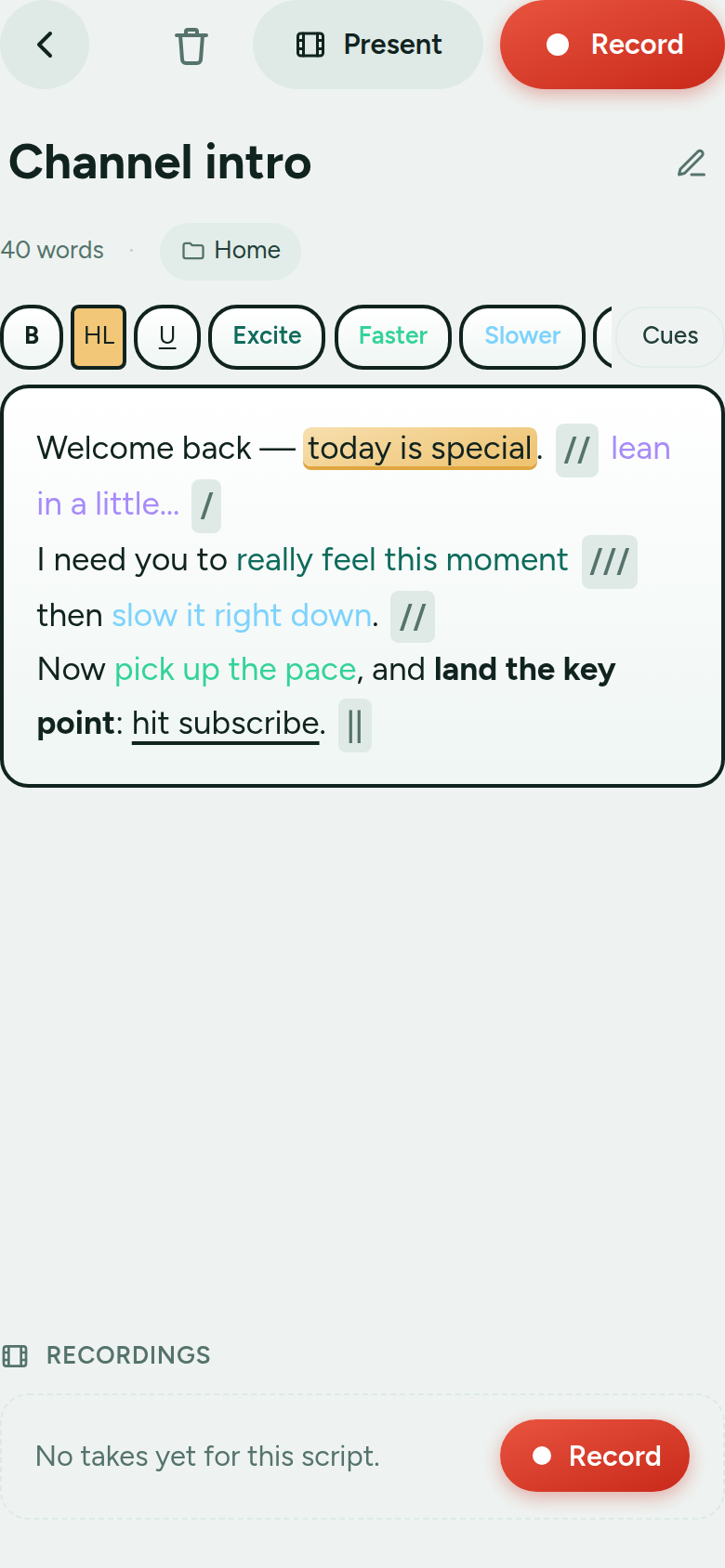
The editor shows your styles live; the markup stays hidden.
Fixed styles
These three never change. Select text and tap the button:
- B: bold for emphasis.
- HL: highlight a key line so it stands out at a glance.
- U: underline, e.g. for a link you’ll mention.
Cues: colour + speed
Cues are the heart of the app. A cue is a label, a colour, and a scroll-speed multiplier. You start with three and can add as many as you like:
- Excite: raise the energy (1.0×, i.e. no speed change by default).
- Faster: scroll speeds up to 1.3× while you read it.
- Slower: scroll eases to 0.7× so you can land the moment.
The speed change is local: it only applies while that phrase is passing the reading line, and it returns to normal immediately afterwards. If two cues overlap, their speeds combine. A cue set to 1.0× is purely a colour, with no pacing change.
Make your own
In Settings → Delivery cues you can rename a cue, change its colour, drag its speed, delete it, or Add cue. For example: an orange “Raise voice” cue at 1.2×, or a purple “Whisper” at 0.8×. These are your global defaults.
Per-script overrides
Any single script can have its own cue list. On the script screen, open Cues and turn on Customize cues for this script. It starts as a copy of your defaults; edits there only affect that script. Great when one piece needs a different palette or pacing.
Pauses (caesura marks)
With Caesura mode on (it is by default; switch it off in Settings) you get four pause marks. Insert them from the toolbar or the keyboard bar; each holds the scroll for its own length when it reaches the middle of the reading line, then carries on:
- /: a small catch of breath.
- //: a medium pause.
- ///: a long pause.
- ||: a dramatic full stop.
Each mark’s exact length is adjustable in Settings → Caesura (in seconds, in 0.05 s steps), and, like cues, can be overridden per script. A pause holds for the same time whatever your pace, text size or screen. You can also turn pause marks on or off for just one script (Pause marks for this script in the editor’s cue settings: Default, On or Off). Unlike the styles above, the pause marks stay visible while you read, as little signposts.
Editing is WYSIWYG
You always edit the finished, styled text; the underlying markup stays hidden. Type naturally; the colours, highlights and pause marks are just part of the words. To remove a style, select the text and tap the same button again to toggle it off.
Copy & paste
Copy from the editor and the hidden codes travel with the text, so formatting survives a trip through another app. Paste back in and anything malformed is cleaned up automatically. You can even type the pause marks /, //, /// or || as plain text elsewhere and they’ll be recognised on paste, while ordinary slashes inside words (like and/or or a URL) are left alone.
Next: Getting started · Recordings · Free vs Pro & sync